The Best Trustpilot Alternative:
Trustmary
Looking for Trustpilot alternatives? Switch to Trustmary and get more features for the fraction of the price.
- Bring reviews from 3rd-party platforms to your own website.
- Improve trust, boost visibility in search and AI tools, and convert 20% more leads on your website.
- Collect reviews automatically with GDPR-compliant tool.
- Analyze your reviews and improve customer experience.

Differences between Trustmary and Trustpilot
Trustmary
- Costs 5-10 times less than Trustpilot with the same or even more features.
- Focus is on your company: you have access to your 1st-party reviews and can use them in your marketing freely.
- Import reviews from different review platforms and add them to your website.
- Boosts your website in Google and AI search and increases website conversions 20%.
- Collect 2-4 times more reviews with a superior review collection method.
- Automatic collection, integration, and analytics for an affordable price.
- Suitable for B2C and B2B brands.
Trustpilot
- 3rd-party review platform that most consumers know and trust.
- Trustpilot owns your reviews and can decide what to do with them.
- Very expensive: can cost 5-10 times more than Trustmary.
- Rigid system: you have very little power over how and where to showcase your reviews.
- Shows ads on your review page (unless you pay to remove ads).
- Predominantly for B2C brands.
- Has many analytics, integration, and automation features, but the cost is very high.
Compare Trustmary and Trustpilot features and pricing
See for yourself why Trustmary is the best Trustpilot alternative.
Features | Trustmary | Trustpilot |
Price | Starting from $15/month | Standard: $225 / month |
Freemium | ✅ | ✅ with ads |
Display reviews | ✅ Yes, from many different sources | ✅ |
Import reviews | ✅ | ❌ Nope |
Collect reviews | ✅ Capture also private feedback | ✅ |
Video testimonials |
| ❌ |
Widgets | ✅ Unlimited | ❌ Limited widgets |
Social sharing | ✅ | ✅ |
Help documentation | ✅ Extensive | ✅ |
Chat & email support | ✅ Epic | Email/form only |



Switching from Trustpilot to Trustmary
HRx had previously used Trustpilot, but found the results underwhelming. The response rates were low, and the process for giving feedback was too complicated.
Switching to Trustmary changed everything:
- Frictionless feedback process: Customers can leave reviews quickly and easily.
- Automation through HubSpot: Every completed transaction triggers an automatic feedback and review request, ensuring consistent feedback without manual work.
- Slack integration: Reviews flow directly into HRx’s internal channels, enabling leaders to act on feedback immediately.
– Compared to Trustpilot, the response rate with Trustmary is many times higher. The user experience is frictionless, and that makes all the difference, Erick says.
What You Get With Trustmary
Branded
3-in-1 survey
2-4 times more
responses
40% feedback-to-review rate
Looking to migrate from Trustpilot?
We’d love to help you import data and set up processes, or you can always do it yourself.
How to start using Trustmary
Step 1: Import reviews
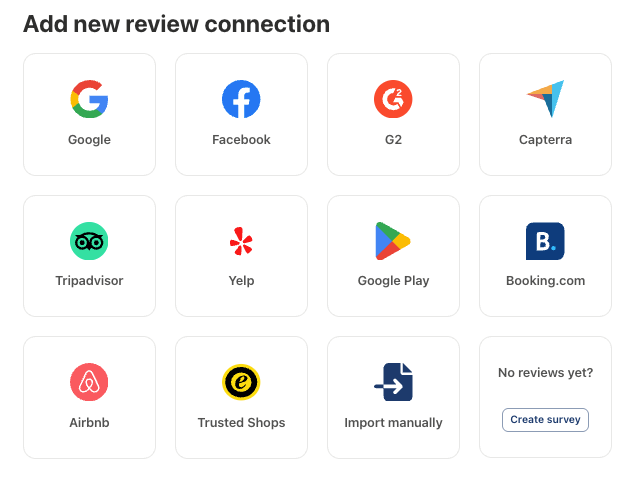
Trustmary can import reviews from multiple review sources: Google, Facebook, Yelp, TripAdvisor, Capterra, G2, and Google Play. Choose your platform and connect it by simply copying and pasting the review page URL.
Unfortunately it’s not possible to import Trustpilot reviews, because remember: Trustpilot owns the reviews and doesn’t allow other service providers use them. You can continue using Trustpilot’s freemium plan next to Trustmary’s comprehensive solution.
Step 2: Check your widget
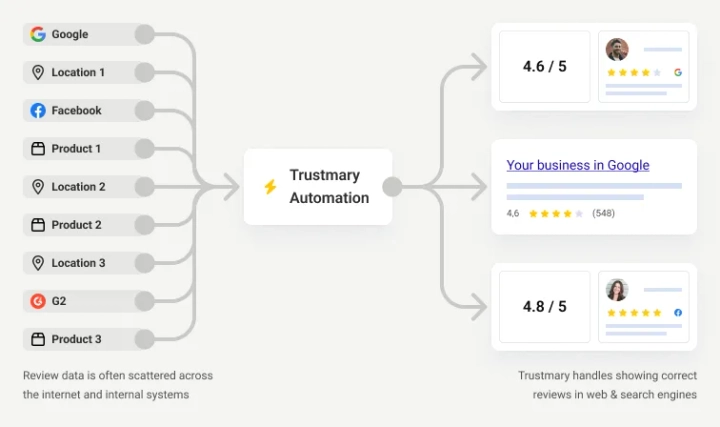
Unlike Trustpilot’s widget, which only shows Trustpilot reviews, Trustmary automatically generates a review widget out of your imported reviews and matches it with your website’s design.
It’s ready to go, but you can also customize it further if you want to. Custom CSS modifications are also possible to ensure the review widget fits your brand to a tee.
You can easily filter reviews and manage different locations with one dynamic review widget.
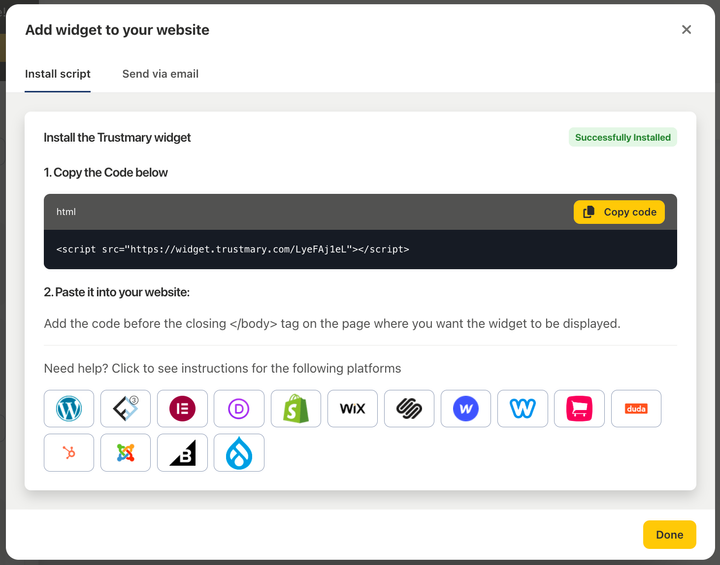
Step 3: Copy and paste the review widget embed code
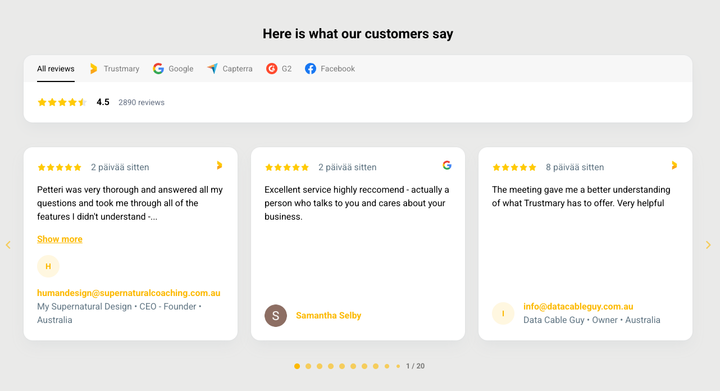
Step 4: Turn Reviews into Conversions
Trustmary doesn’t just collect reviews; it helps you use them where it matters most: on your website.
- High-converting review widgets
- Smart popups to show social proof at the right time
- SEO-friendly and customizable
Trustpilot’s review widgets lack the flexibility Trustmary offers and offer limited filtering options.
Sounds easy, right?
You can do all this right now, and start seeing results immediately.
Key features

Import reviews
Import existing reviews from the biggest review sites like Google, Yelp, and TripAdvisor.

Stylish widget designs
Display reviews with a tried and tested review widget perfect for your use case.

Fits your website seamlessly
Customize the widget to seamlessly fit your brand or use automatic design alignment.

Full control of reviews
Collect more reviews on any platform with easy review campaigns. No more wrongfully deleted reviews – You’re in control!

Automatic goal tracking
See your review widget’s impact with real-time conversion tracking.

Personal help
We offer real human customer support to help with any questions or problems with the app.
Start using the best review tool today.
Embed reviews on any website
Trustmary’s review widget is compatible with most CMS and website builders.
Works on all major CMS
- WordPress
- Shopify
- Squarespace
- Wix
- And many more

Import reviews from
- Google for a branded Google review widget
- Facebook to create a Facebook review widget
- Yelp
- Tripadvisor
- G2
- Capterra
- Or an all-in-one review widget that combines all of your review sources

Start for free
- Free review widget for up to 200 views/month
- No credit card is required to get started
- No binding terms – cancel anytime
Ready to save money and get more bang for your buck?
FAQ
Reviews build trust and help you get more leads and customers from your website. The power of reviews is based on the social proof effect that makes people follow other people’s behavior.
The review widget is free up to 200 views a month. If your website gets more monthly visits than that, you might need one of the paid plans.
Trustmary is a user friendly review management tool that helps you import, showcase, test, and manage reviews. Trustmary has various customizable widget templates and an easy-to-use widget editor. It’s also completely risk-free. No payments, no credit card required, no binding terms.
Trustmary users praise the premium support, customization options, and the modern look and feel of the software.
You can import reviews from Google, Facebook, Yelp, TripAdvisor, Capterra, G2, Google Play, or custom sources like spreadsheets. In the freemium plan, you can choose one source. Upgrading to a paid plan gets you more sources.
- Sign up for free with your email address.
- Import reviews from your main review source
- Create and tailor widgets to fit your need
- Place reviews on your website to boost trust
Skip the hard work and looking for API access and keys: Start using Trustmary.
You can simply copy the HTML code from Trustmary, and paste it to the right spot on your website using an HTML block.
Use Trustmary’s review widget. Import reviews from Google or another review site. Once you have created the widget, simply copy and paste the HTML code to your website.
Trustmary’s review widget works on WordPress, Squarespace, Wix, Shopify, and 99% of other CMS.